A Korvus trading tool · by BlackCrownVxJ.LLC

LodeStone.

An ICT liquidity context indicator for intraday index futures, built for TradingView. LodeStone marks the levels that matter, keeps the chart clean while it does it, and never once tells you what to do. Included with the Korvus Operator (Pro) membership.

Non-repainting Confirmed bars only No signals, no arrows Self-cleaning levels Labels never overlap
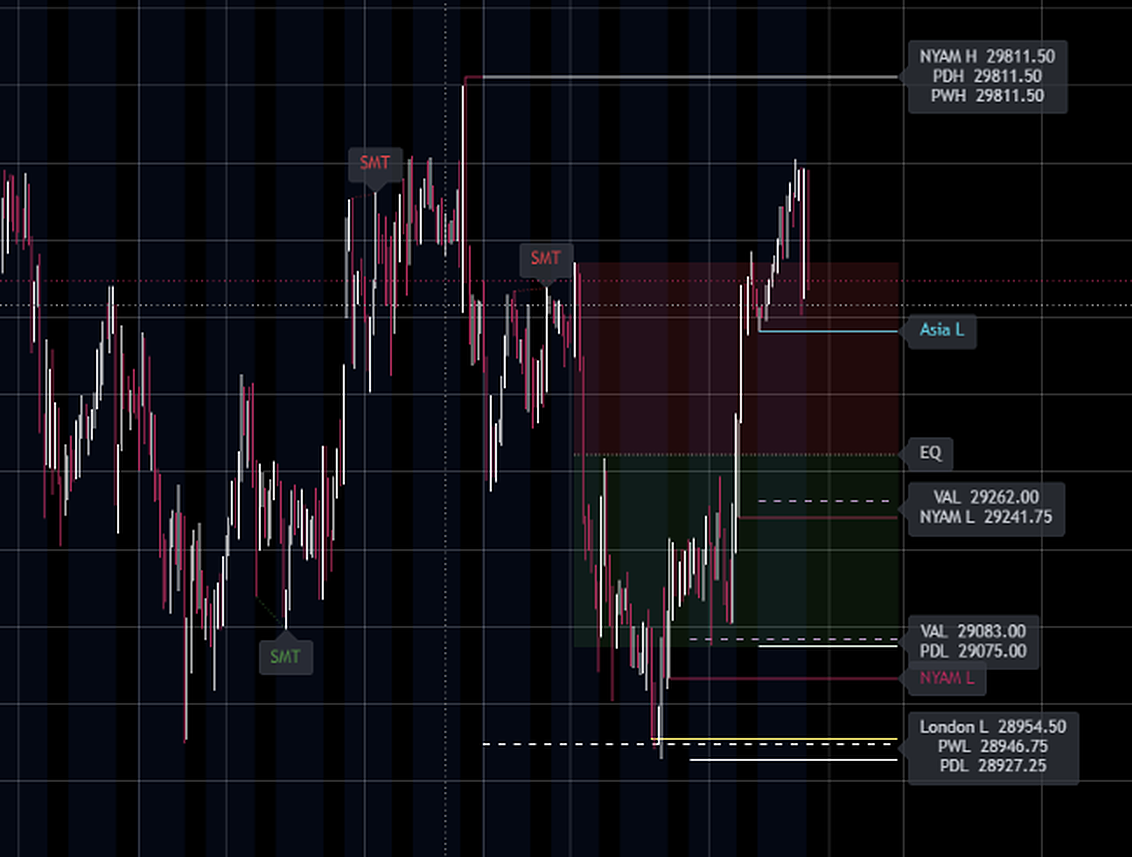
LodeStone running on an NQ futures chart on TradingView: stacked session level labels at the right cutoff, premium and discount shading with equilibrium, value area lines, and SMT divergence marks at the swings
LodeStone on NQ (CME), 1-hour chart on TradingView · real market data, real capture
Five modules, one registry
Everything you keep five indicators around for,
in one disciplined tool.

Every module is individually toggleable, and every level it draws lives in one shared registry that cleans itself: swept levels fade to quiet stubs or remove themselves, and old levels age out.

01 · Session levels

Session highs and lows

Completed Asia, London, NY AM and NY PM highs and lows, plus prior day and prior week. Each level runs to a fixed cutoff past the live bar with its name at the line, so you always know which pool you are looking at.

02 · Premium / Discount

The dealing range

A range built from confirmed swing points, a completed session, or the prior day, with a faint equilibrium line and subtle zone shading. One glance tells you which half of the range you are paying in.

03 · Resting liquidity

Relative equal highs and lows

Equal swings within a tick tolerance are marked as resting liquidity. Extra equal swings reinforce the existing line instead of stacking duplicates, and the registry cleans them like everything else.

04 · SMT divergence

Cracks between correlated pairs

Your chart's swings compared against a correlated symbol, with automatic NQ and ES pairing and a manual override. Bearish when your chart makes a higher high the pair refuses; bullish on the mirror. Stamped only when the swing confirms.

05 · Volume profile

Restrained by design

No histogram, ever. Profiles are computed internally and only the finished levels print: naked POCs that delete themselves the first time price trades at them, or POC with value area high and low.

+ · The label engine

Labels that cannot overlap

Names sit at a shared right cutoff on subtle backdrop chips. Levels that sit close together merge into one stacked chip whose rows run top to bottom in the same order as the lines beside it, each row carrying its exact price. A combined chip reads as a map of its lines.

The discipline
What LodeStone refuses to do
is the reason to run it.

It never repaints.

Every level, swing, and profile updates on confirmed bars only. Nothing prints and then quietly un-prints after the fact. What you screenshot is what happened.

It never signals.

No arrows, no buy and sell stamps, no scores. LodeStone draws context and leaves the decision where it belongs: with you and your model. If you want a tool that trades for you, this is not it.

It never clutters.

Swept levels fade or remove themselves, only the most recent levels of each type are kept, and the label engine guarantees readable names at any zoom. The chart stays a chart.

How access works
Three steps, one membership.

LodeStone is distributed through TradingView's invite-only script system, which keeps the source closed and ties access to your exact TradingView username.

1

Go Pro on Korvus

LodeStone is included with the Operator (Pro) membership at no extra cost, alongside real-time data during market hours, high-impact alerts, and the full terminal.

2

Add your TradingView username

On your account page, save your exact TradingView username. Spelling and capitalization matter, because access is granted to that name and nothing else.

3

We grant access

Access is granted manually through TradingView's invite-only system, normally within 24 hours. LodeStone then appears in your Indicators panel under the Invite-only scripts tab.

Pricing
Included with Operator (Pro).
Not sold separately.
Korvus Pro

Operator

$9.99/mo
auto-renews monthly · cancel anytime
or $79.99/yr billed annually
  • LodeStone TradingView indicator, this page's tool
  • Real-time quotes on the live panels during US market hours
  • Live SMT divergence during market hours
  • Personal watchlist imports
  • High-impact email alerts
  • The full 24/7 scored news terminal
Go Pro, $9.99/mo
Secure checkout by Stripe. LodeStone access is part of the membership and is revoked if the membership ends. Your TradingView account itself is never touched.
Terms · Privacy · Risk Disclosure
Questions
Straight answers.
Do I need a paid TradingView plan?
No. Invite-only script access is granted by the author to your username, and a free TradingView account can run LodeStone once access is granted. A paid TradingView plan changes nothing about how LodeStone works.
I chart on another platform. Is LodeStone useless to me?
LodeStone runs only on TradingView, because it is built in Pine Script. If you execute on another platform, a free TradingView account takes a couple of minutes to create and many futures traders chart there while executing elsewhere. And if you skip the indicator entirely, everything else in your Pro membership works exactly the same.
Does it repaint?
No. Swings, levels, and profiles are used only after bar confirmation, so nothing is drawn and then removed when the bar closes differently. This costs a few bars of patience and buys you a chart you can trust.
Will it tell me when to buy or sell?
No, deliberately. LodeStone is context and decision support: it shows you where the levels, liquidity, and divergences are. Your entry model, your risk, and your decisions stay yours. We do not sell signals and we do not promise profits.
What happens if I cancel Pro?
LodeStone access is part of the membership, so it is revoked when the membership ends. Your TradingView account, charts, and layouts are untouched; the indicator simply stops being available to your username. Rejoin Pro and access is granted again.
Can I see or copy the source code?
No. Invite-only scripts are closed source on TradingView: the platform runs the script and you see the drawings, never the code. That protection is exactly why we distribute it this way.
How fast is access granted?
Grants are done manually by a human, normally within 24 hours of saving your TradingView username on your account page. You will find LodeStone under Indicators, in the Invite-only scripts tab.
Important: LodeStone and Korvus are informational and educational tools, not financial, investment, legal, or tax advice, and not a recommendation to buy or sell any security, futures contract, or other instrument. Trading futures and leveraged products involves substantial risk of loss and is not suitable for everyone. You alone are responsible for your own trading decisions and outcomes. LodeStone draws analytical context on charts you supply inside TradingView; it does not generate trade signals and no performance is promised or implied. TradingView is a platform owned by TradingView, Inc., which is not affiliated with and does not endorse Korvus or BlackCrownVxJ.LLC. See our Risk Disclosure for full terms.